
Appearance
Companies and workspaces
A company is a workspace linked to one or more users. It has its own plan, subscription state, and user roles.
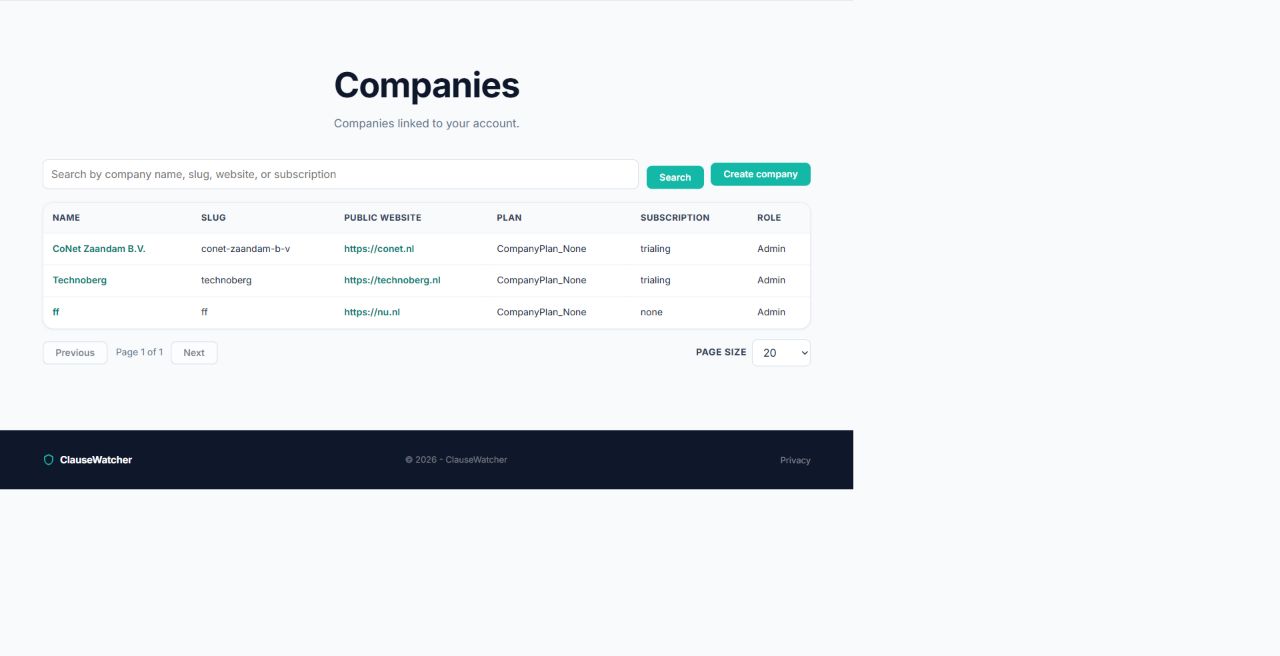
Browse companies
Open Companies from the main navigation. Search and sort by name, slug, website, plan, subscription status, or your role. Use the page-size selector and pager for longer lists.
Select a company name to view its details.
Create a company
- Open Companies.
- Select Create company.
- Enter its name and a stable slug.
- Optionally enter its public website URL.
- Save.
ClauseWatcher checks for similarly named companies while you type. Review suggestions to avoid duplicates.
Switch the active company
Use Switch on the dashboard, or open the company selector in the user menu. The active company is highlighted. After switching, ClauseWatcher returns to the page you were using when possible.
Company details and subscription
The company page shows its website, plan, your role, subscription status, start/end dates, and recurring interval when available.
- Select Buy subscription when the company has no active subscription.
- Select Change subscription to choose a different offer.
- Select Manage billing to open the external customer portal for an active or grace-period subscription.
Checkout and billing pages may open in a new tab. Return to ClauseWatcher after completing the external flow; subscription status updates can appear as in-app notifications.