
Appearance
Quick document check
Quick add is the shortest route from a URL or PDF to a ClauseWatcher analysis.
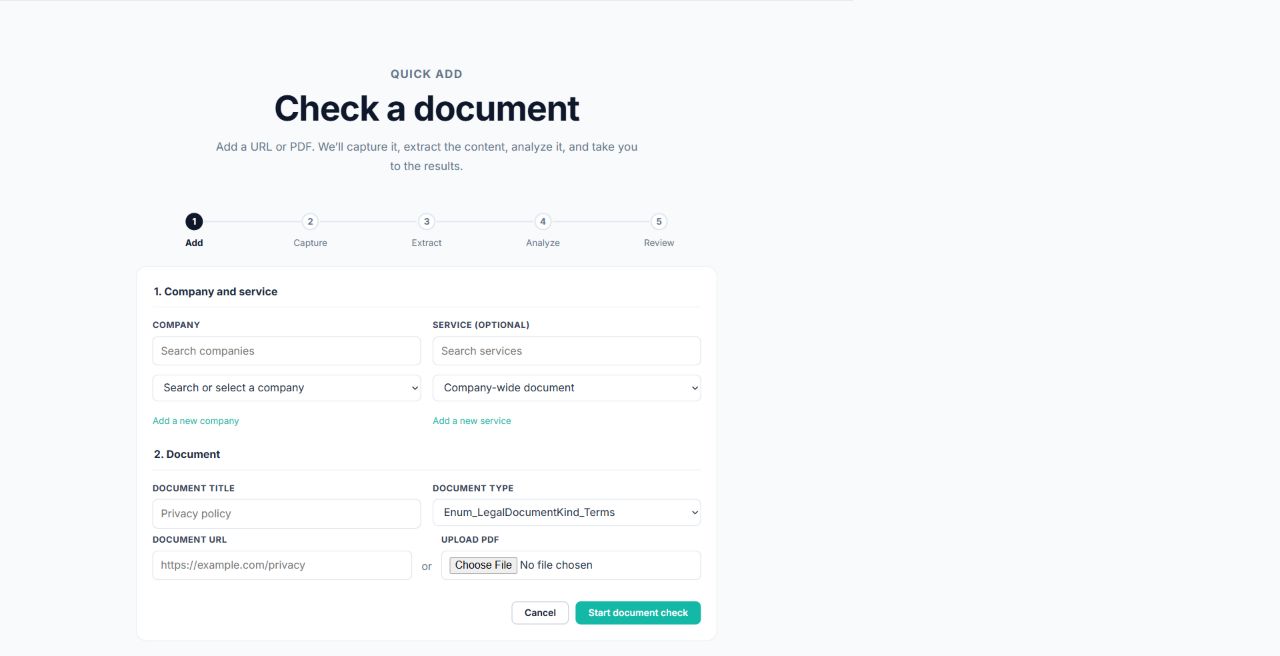
Submit a document
- From the dashboard, select Check a document or Quick add.
- Select the company or brand.
- Optionally select a service. The service must belong to the selected company or brand.
- Enter a document title.
- Select the document type.
- Do one of the following:
- enter a valid HTTP or HTTPS document URL; or
- upload one PDF no larger than 25 MB.
- Select Start document check.
Provide exactly one source: one URL or one PDF.
If ClauseWatcher finds a likely existing document, it may offer View suggested document. Review it before creating another record.
Follow progress
After submission, the progress page shows the document title and current state. Processing may continue in the background.
When the check is complete, select Review results. You can also select Check another document to start a new check.
If submission fails
Confirm that:
- a company or brand is selected;
- the optional service belongs to it;
- the URL starts with
http://orhttps://; - the PDF is no larger than 25 MB;
- only one source method is filled in.
See Troubleshooting for more help.